

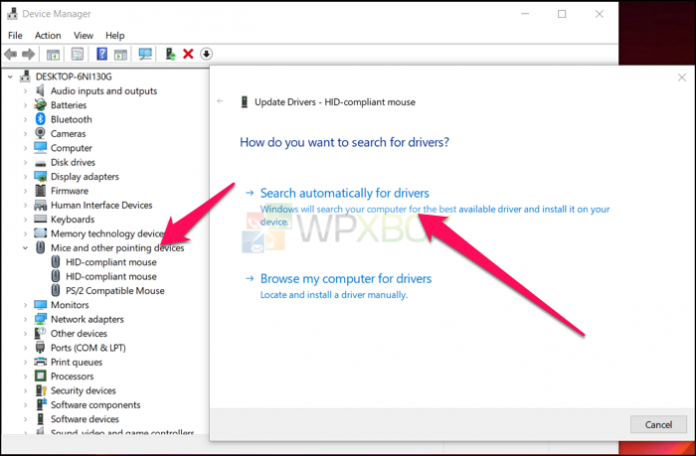
An outdated driver will have a lot of issues with the device. The problems include display problems, brightness adjustment issues, mouse not detected, etc. The Operating System manufacturers constantly provide the driver with updates to make it compatible with other devices and the OS itself. Updating the drivers for your optical drive (CD-ROM, CD-R, CD-RW, DVD) may improve its performance. We recommend you visit our CD drivers page for a listing of manufacturers and their driver update pages to obtain the latest drivers. A CPU is the central processing unit, which is really the brain of your computer.
The Super key can be used to activate the menus/launchers and many. If you can’t find the driver, open the System File Checker. This troubleshooting tool can automatically fix any system files that are corrupted.
Reinstall Your Bluetooth Driver
Right-click on Gotham Knights from the list of games. Once it is done, you just need to reboot your system once to fully install the updates. Any pending or new updates available will show up, which you can install by clicking Download and install. On the Task Manager, go to the Statup tab, and disable all the services that have high startup-impact. Stan Kats is a Professional Technologist and the COO and Chief Technologist for The STG IT Consulting Group in West Hollywood, California. Stan provides comprehensive technology solutions to businesses through managed IT services, and for individuals through his consumer service business, Stan’s Tech Garage.
- In Windows 10, you can find out what motherboard you have by using the System Information tool.
- For this, you simply need to visit the official driver support page of your PC manufacturer.
- Right-click one of the processors and click Uninstall device.
Open the Settings app by searching for it in the Start Menu or simply using the ” Windows + I ” shortcut keys. Select ” Windows Update ” from the left pane of your Settings app window. Next, click on the ” Check for updates ” button on the left pane. Download and install Advanced Driver Updater.
Windows 98 and Windows Desktop Update
Then, wait for at least 30 seconds before clicking the toggle button again. Afterward, run the System File Checker tool. This will repair any corrupt or faulty files on your computer, allowing you to reconnect wireless devices to Windows. update HP Network cards drivers windows 10. We hope you like this installation guide. If you find it useful, then share it with others around your circle. And, if in case, you have something to add regarding the HP laptop Bluetooth driver download, then, please drop it in the comments section below.
This will scan for all hardware connected to your computer, and install default drivers if required. Once the scanning process is complete, you should be able to see the Bluetooth option back in the Settings window. You may have to restart your computer a couple of times before you’re able to see the Bluetooth option again. If that still doesn’t solve the problem, you can try to remove your Bluetooth drivers and restart your PC.